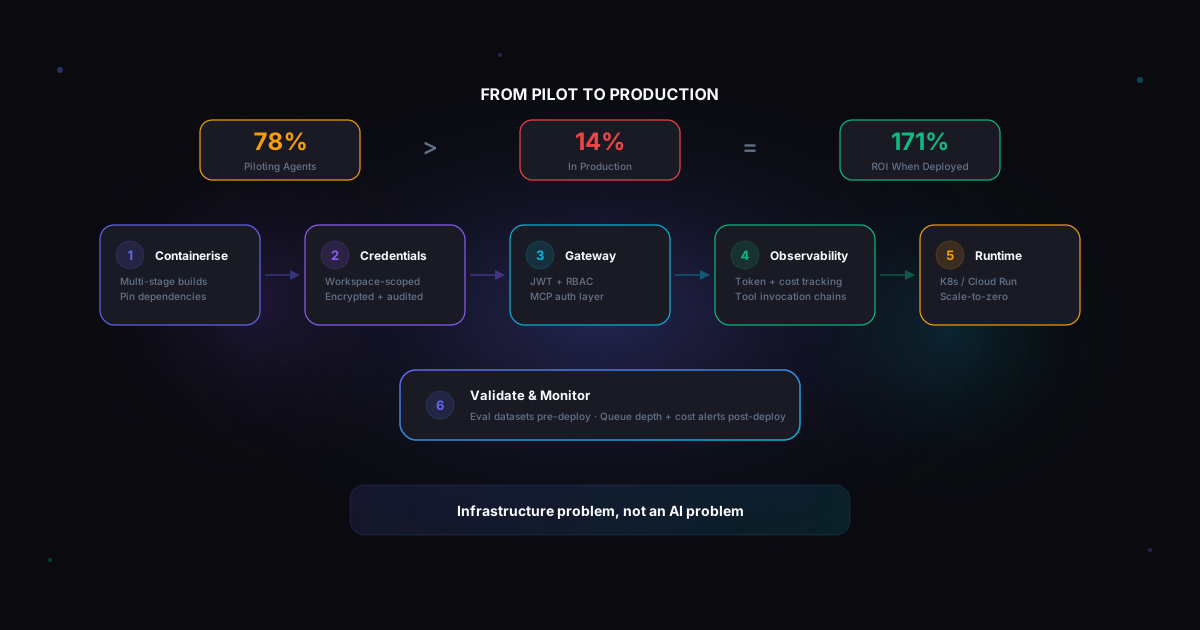
78% of enterprises are piloting AI agents. Only 14% have made it to production. Here's why the gap exists and how to close it.
I keep having the same conversation with platform engineering leads. They built an agent. It works on a laptop. They containerised it, pushed it to Kubernetes, and expected the same deployment playbook they've used for every microservice since 2018.
Then reality hits. The agent burns through API credits overnight. Credentials are scattered across ConfigMaps. There's no audit trail. And when the compliance team asks what the agent actually did last Tuesday, nobody can answer.
A survey of 650 enterprise technology leaders published this month found that 88% of AI agents never make it to production. The ones that do return 171% ROI on average. The difference isn't the model or the framework — it's the deployment infrastructure.
Why your microservice playbook breaks
Agents look like containers. They have a Dockerfile, an HTTP endpoint, and they run in a pod. But they behave fundamentally differently at runtime.
A microservice does what the code says. You can read the handler and predict every response. An agent decides at runtime which tools to invoke, what data to access, and how to chain actions together. Give it access to Gmail and Google Drive, and a single prompt can trigger a dozen API calls across multiple services — all autonomously.
This means three things your existing deployment pipeline doesn't handle:
Credentials need scoping, not just storage. Your financial research agent and your HR document bot both run on the same cluster. With standard Kubernetes Secrets, they can see each other's credentials. That's not a theoretical risk — 74% of organisations say their agents receive more access than necessary, according to a January 2026 CSA/Aembit survey of 228 IT and security professionals.
Execution boundaries need enforcement at the infrastructure level. You can't control what an agent does by reading the code, because it makes decisions at runtime. The boundaries need to live in an agent gateway that validates authentication per tool call and enforces RBAC before routing requests.
Observability needs to track what agents do, not just whether they're running. Your Grafana dashboard shows healthy pods and low latency. Meanwhile, the agent is happily hallucinating tool parameters. You need tracing that captures token consumption, tool invocation chains, and cost per execution.
The deployment pipeline that actually works
After watching teams struggle with this — and building infrastructure to solve it — here's the pattern that gets agents to production reliably.
1. Containerise with intent
Multi-stage Docker builds. Base layer with system dependencies, app layer with your agent code and model artifacts. Keep images small. Pin your dependencies — agent frameworks ship breaking changes regularly. CrewAI's v0.4 rewrite is still causing headaches for teams that didn't pin.
2. Treat credentials as first-class citizens
Every external service your agent touches needs a credential. Gmail OAuth tokens, Slack bot credentials, search API keys, vector database auth. Each one needs to be:
- Encrypted at rest (not base64 in a ConfigMap)
- Scoped to the agent's workspace (not shared across deployments)
- Decrypted just-in-time at deploy time
- Logged on every access
The standard Kubernetes approach of mounting everything as environment variables creates a flat credential space with no isolation and no audit trail. At minimum, use external vaults (AWS Secrets Manager, HashiCorp Vault) referenced from K8s manifests. Better yet, use a platform that handles workspace-scoped credential injection natively.
3. Put a gateway in front of tool access
If your agents connect to MCP servers — and given that the MCP TypeScript SDK now has 34,700+ dependent projects on npm, they probably will — you need a gateway layer.
Here's the uncomfortable reality: Knostic scanned roughly 2,000 internet-exposed MCP servers in mid-2025. Every single one lacked authentication. The MCP spec makes all security controls optional and unenforced. The 2026 roadmap acknowledges this and prioritises enterprise readiness, but fixes are still in draft.
Until the protocol catches up, your agent gateway needs to validate JWTs, enforce per-tool RBAC, and handle OAuth token passthrough so agents can make user-scoped API calls without exposing raw tokens.
4. Build observability around what matters
Standard APM tells you the pod is healthy. Agent-native observability tells you:
- This conversation consumed 48,000 tokens across 6 LLM calls costing $0.73
- The agent called Tavily search, then Gmail, then Google Docs in that order
- The Gmail call used credential ID xyz-123 from workspace "Finance"
- The agent hit a rate limit on the third tool call and retried twice
Without this, you're flying blind. And flying blind with autonomous systems that have access to production APIs is how you end up in a Gartner statistic. (They predict over 40% of agentic AI projects will be cancelled by end of 2027, largely due to escalating costs and inadequate risk controls.)
5. Pick the right runtime for the workload
Not every agent needs a persistent Kubernetes deployment.
Stateless agents (respond to a request, done) — run on Cloud Run or Lambda. Auto-scaling, scale-to-zero, pay per invocation. Perfect for agents that get triggered by webhooks or scheduled tasks.
Stateful agents (maintain context across sessions) — run on Kubernetes with persistent storage. The new Kubernetes Agent Sandbox project (now in CNCF) provides a declarative API for singleton, stateful agent workloads with support for scale-to-zero while preserving state.
DevOps/platform agents — look at Kagent (CNCF Sandbox), which ships with MCP server tools pre-wired for Kubernetes, Istio, Helm, Argo, and Prometheus.
6. Validate before you deploy, monitor after
Pre-deployment: run your agent against evaluation datasets. Check that tool calls resolve correctly. Verify MCP server connectivity. Confirm credentials are valid.
Post-deployment: monitor queue depth (more meaningful than CPU for agents — they spend most time waiting on network calls), track cost per execution, and set alerts on anomalous tool invocation patterns.
The organisational piece nobody talks about
The Digital Applied survey found that organisations without a dedicated AI operations function were 6x more likely to experience incidents requiring rollbacks. The 12% who successfully scaled agents to production shared four attributes: pre-deployment infrastructure investment, governance documentation before deployment, baseline metrics, and dedicated business ownership.
In plain English: the team that succeeds isn't the one with the best prompt engineering. It's the one that treats agent deployment as an infrastructure problem, not an AI problem.
Where to start
If you're deploying your first agent to production:
- Pick one agent with a well-defined scope and limited tool access
- Set up workspace-scoped credentials from day one (you'll thank yourself at agent #5)
- Put a gateway in front of any MCP server connections
- Instrument with LLM-native tracing before you ship, not after the first incident
- Set token budgets and cost alerts — the $4,000 overnight surprise is more common than anyone admits
The gap between 78% piloting and 14% in production isn't about AI capability. It's about deployment infrastructure. The good news is it's a solved problem — if you treat it as one.
Manny Maun is the Founder and CEO of BiznezStack — the agentic operations runtime for deploying, securing, and governing AI agents at scale.